Combined gauge instrument
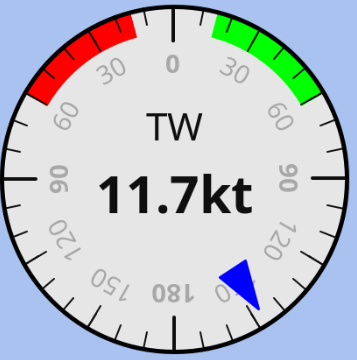
The combined gauge is a Simple gauge that additionally displays a numerical value from a second Signal K path in the center of the dial. The needle keeps showing the primary value (typically an angle or direction), while the center shows the secondary value (typically a related scalar, such as a speed).
This is convenient for the common wind display where the apparent (or true) wind angle is shown by the needle and the corresponding wind speed is shown in the center, saving the screen space of two separate instruments.
The needle, scale, zones and colors work exactly as for the Simple gauge and act on the primary SK key. The primary value is only shown by the needle and is never displayed as text.
The number displayed in the center of the gauge is always the center value (the second key). Because of that, the Format, Value suffix and the related Transformation controls on this instrument apply to the center value, and the instrument adds a Center value SK key and a Center value transformation:
| Parameter | Description | Example |
|---|---|---|
Center value SK key |
Fully qualified Signal K path to the value displayed in the center of the gauge. When left empty, the center shows dashes. |
vessels.self.environment.wind.speedApparent |
Center value transformation |
Function used to convert the center value from the SI unit used by Signal K to human readable form (same options as the Simple gauge |
m/s → kn |
Format |
Format of the number displayed in the center (the center value). |
9.9 |
Value suffix |
Optional text appended to the center value. |
kn |
Transformation (without the Center value prefix) still applies to the primary value and is used to convert it for the needle (e.g. RAD → DEG for an angle). Zones define how the gauge itself looks and are evaluated against the primary value, as in the Simple gauge.
To build the classic apparent wind gauge:
-
Set
Gauge typetoRelative angle. -
Set
SK keytoenvironment.wind.angleApparentandTransformationtoRAD → DEG(needle shows AWA). -
Set
Center value SK keytoenvironment.wind.speedApparentandCenter value transformationtom/s → kn, then setFormatto9.9andValue suffixtokn(center shows AWS).